
Warranty isn’t insurance. And neither one is AppleCare.
Three coverage types share a single device. Manufacturer warranty ships with the hardware. Third-party insurance is the policy your district pays a vendor for. AppleCare+ is Apple’s hybrid plan, attached to a specific serial. Treating them as one notes field is how a district ends up filing the wrong claim under the wrong policy the first time a Chromebook lands on the floor. Manage1to1 tracks each as its own first-class record so the question at incident time isn’t "which one covers this," it’s the repair.
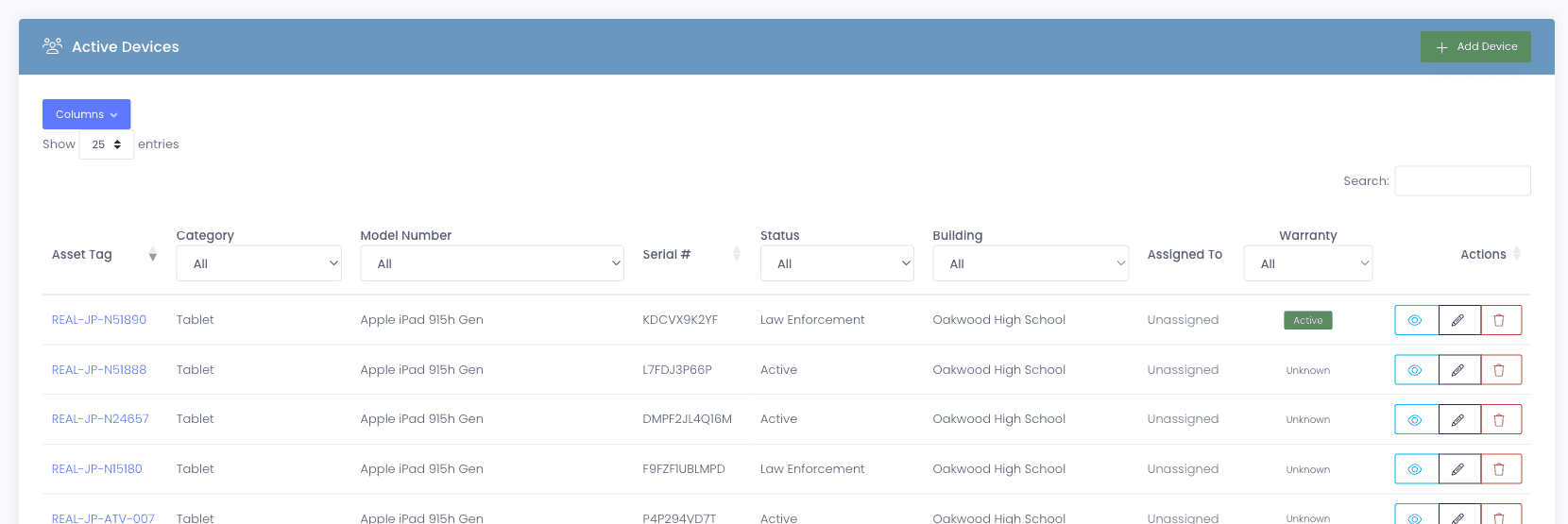
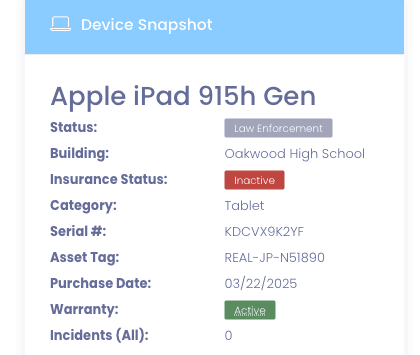
Status badges
Make the status visible where techs actually look.
Every device profile shows the current warranty status at a glance. Active means you’re inside the coverage window. Expiring Soon flags devices whose Warranty End is within the next thirty days, which is when the procurement conversation should start, not when the warranty has already lapsed. Expired tells the tech in front of you that this device is no longer covered, before they spend an hour pricing a vendor repair that wasn’t supposed to be on the district.
- Badge visible on the device profile and in the device list
- Expiring Soon uses a fixed thirty-day window calculated live from the Warranty End date
- Filter the device list by warranty status (Active, Expiring Soon, Expired, Unknown) to pull every device about to lapse
- Status is computed at render time, so a device labeled Active today becomes Expiring Soon tomorrow with no cron to manage
- Export the filtered list as CSV so procurement can chase replacement quotes on a real roster
Why schools choose Manage1to1
Built for K-12. Not retrofitted from enterprise IT.
Three records, not one muddled field
Manufacturer warranty, third-party insurance, and AppleCare+ each have their own first-class record. Nothing gets conflated, so nothing gets misfiled.
Status badges techs actually see
Active, Expiring Soon, and Expired show on the device profile and the incident screen. No tab switching, no remembering which field means what.
Vendor lookups in one click
A look-up link opens the right manufacturer warranty page with the serial pre-filled where the vendor supports it.
A renewal trail you can budget against
Filter every device about to lapse, export to procurement, plan the renewal cycle before it becomes a surprise next spring.
FAQ
Common questions.
- Manufacturer warranty is the coverage that ships with the hardware, typically defects, manufacturing issues, and some component failures (usually one year for most Chromebooks, longer for premium laptops). Third-party insurance is a policy your district pays a vendor for, covering physical damage, accidental damage, and sometimes theft. AppleCare+ is Apple’s hybrid plan that extends the manufacturer warranty and adds accidental damage coverage with a co-pay. All three are tracked separately on the device profile, with their own dates, statuses, and claim histories.
- For Apple devices, AppleCare+ coverage syncs from Apple School Manager automatically. For Chromebooks and Windows laptops, manufacturer warranty is entered manually or imported via CSV, with vendor-aware look-up links that route to the right manufacturer page so techs can verify coverage in one click instead of three.
- The threshold is a fixed thirty days. Any device whose Warranty End date is within the next thirty days shows as Expiring Soon, and the device list’s Warranty filter dropdown lets you pull every Expiring Soon device in one query. The badge is computed live from the stored Warranty End date at render time, so devices roll forward from Active to Expiring Soon to Expired automatically with no cron or recompute job to manage.
- The replacement comes in with its own serial number. Apple School Manager syncs the new device into Manage1to1, and the warranty record on the new device starts fresh. The original device record keeps its full warranty trail for audit and historical context, and the user is reassigned to the new serial in one step.
- Yes. Accessories can be tracked either as standalone devices in their own category, or as child devices nested under a parent (a case child-linked to a specific Chromebook, for example). Each accessory record has its own warranty fields, and when the parent is replaced the children travel with it through checkouts and returns.
See what fits your district
Stop losing warranty coverage to the calendar.
Tell us your fleet size, your vendor mix (Apple, Chromebook, Windows), and whether you carry third-party insurance. We’ll reply with a quote, a migration plan, and a sample warranty roster against your real data so you can see the workflow before you commit.
- Quote tailored to your enrollment + SLA tier
- Migration plan from your current help-desk / asset tool
- Integration map for your MDM, SIS, and payment processor
- Honest answers, our team is all former K-12, we know what the product does and doesn’t do
Prefer the shared demo first? Try it at manage1to1.com/demo.