
K-12 IT reporting and analytics that your board actually reads.
Live dashboards for technicians, IT directors, business managers, and superintendents. Ticket trends, damage by month, MDM fleet health, loaner queues, every number CSV-exportable for board reports and grant accountability.
Help desk reporting
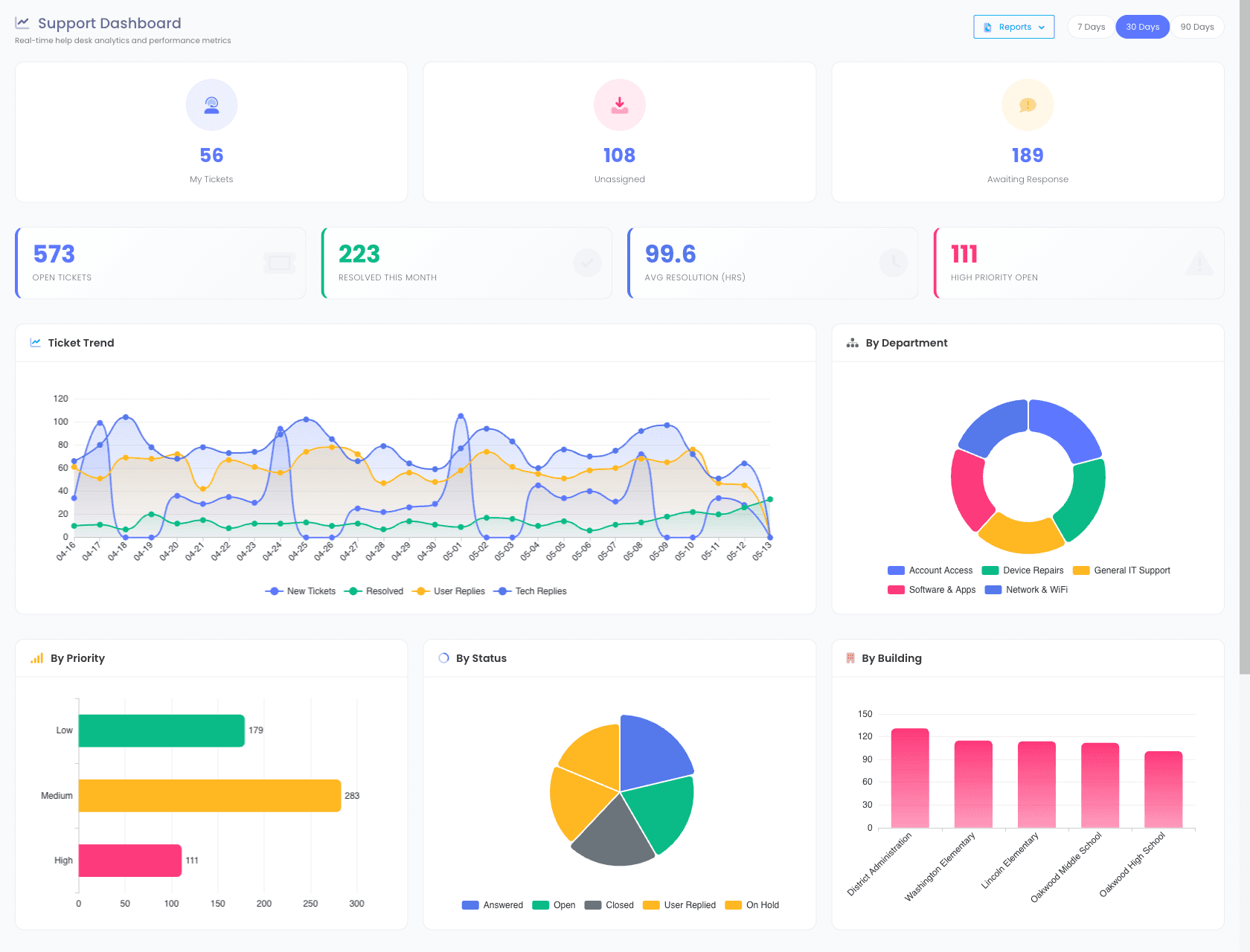
Ticket trend, by department, by priority, on one screen.
The Support Dashboard puts every ticket KPI on the same screen, open count, resolved this month, average resolution time, and trended ticket volume. Donut and pie cuts by department, priority, and status sit next to the trend so the "what changed?" answer is one glance away.
- Open / resolved / resolution-time KPI cards at the top
- Ticket trend over time, New, Tech Replies, User Replies
- By Department donut + By Building bar, see workload by site
- By Priority and By Status charts, triage health at a glance
- Quick Stats is a filtered dashboard rather than a fixed set of charts: narrow every chart at once by building, grade, incident type, severity, device type and date range, opening on the current school year
- Six summary tiles lead it, total devices, how many are checked out, open incidents, incidents per 100 devices, open tickets, and insurance coverage, with the charts grouped into Incidents, Fleet and Financial
- Click any chart to see the records behind the number, so "why is that bar tall" is one click rather than a new report
- Download any chart as a branded image, which is usually what a board packet actually needs
- CSV export of any filtered view for board agendas
Damage trends
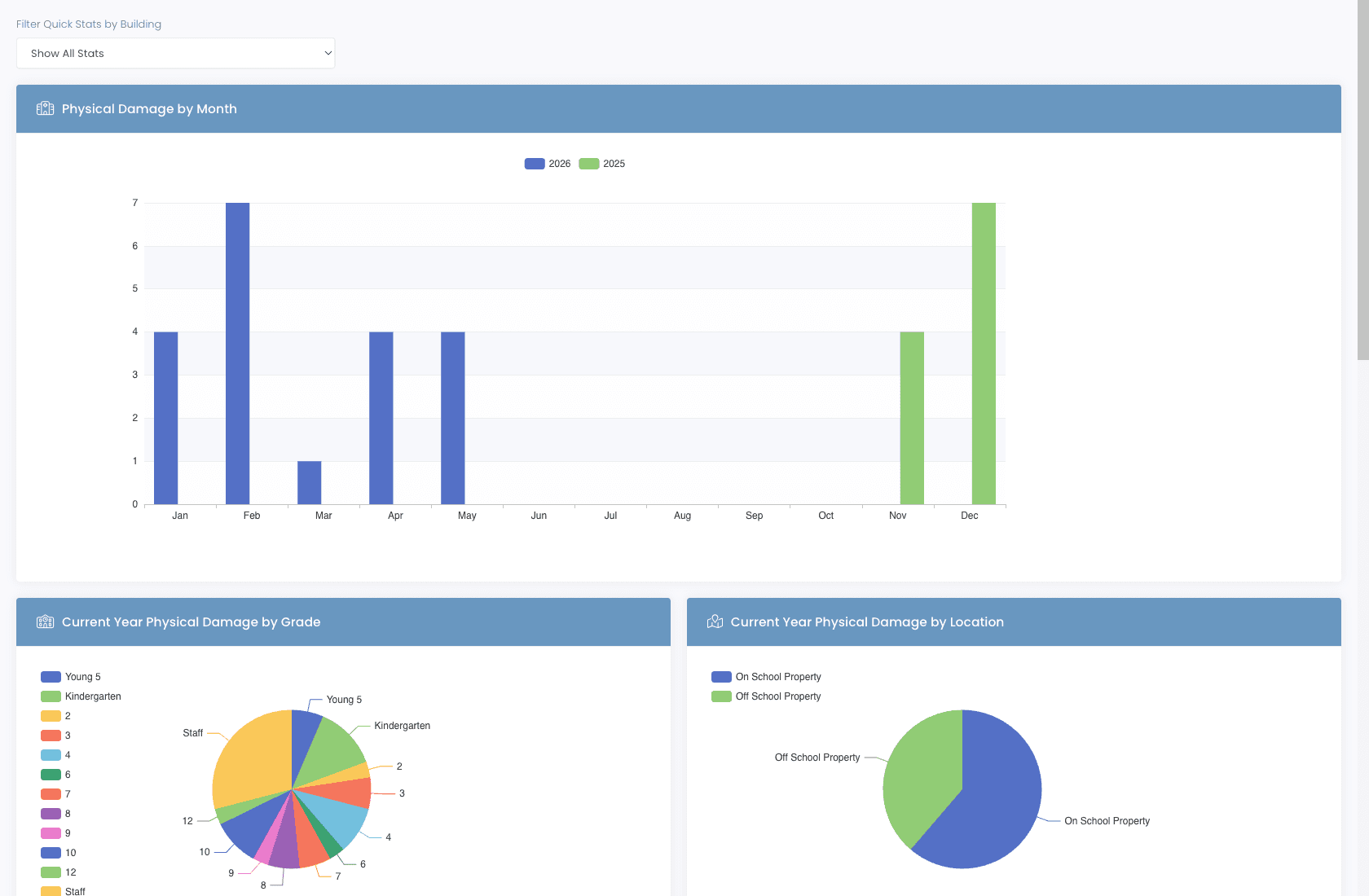
Damage by month, grade, and location.
Which months spike for damage? Which grades return devices in the worst shape? On-property vs off-property, what's the split? The Quick Stats report answers all three with side-by-side year-over-year bars and breakdown pies, so you can shape next year's procurement and parent-handbook policy with real numbers.
- Physical damage by month, current year vs prior year
- Damage by grade, pinpoint which cohorts need device-care reminders
- On-school-property vs off-school-property breakdown
- Filter Quick Stats by building for site-by-site comparisons
- Export everything to CSV, survives the move into your board packet
Loaner reporting
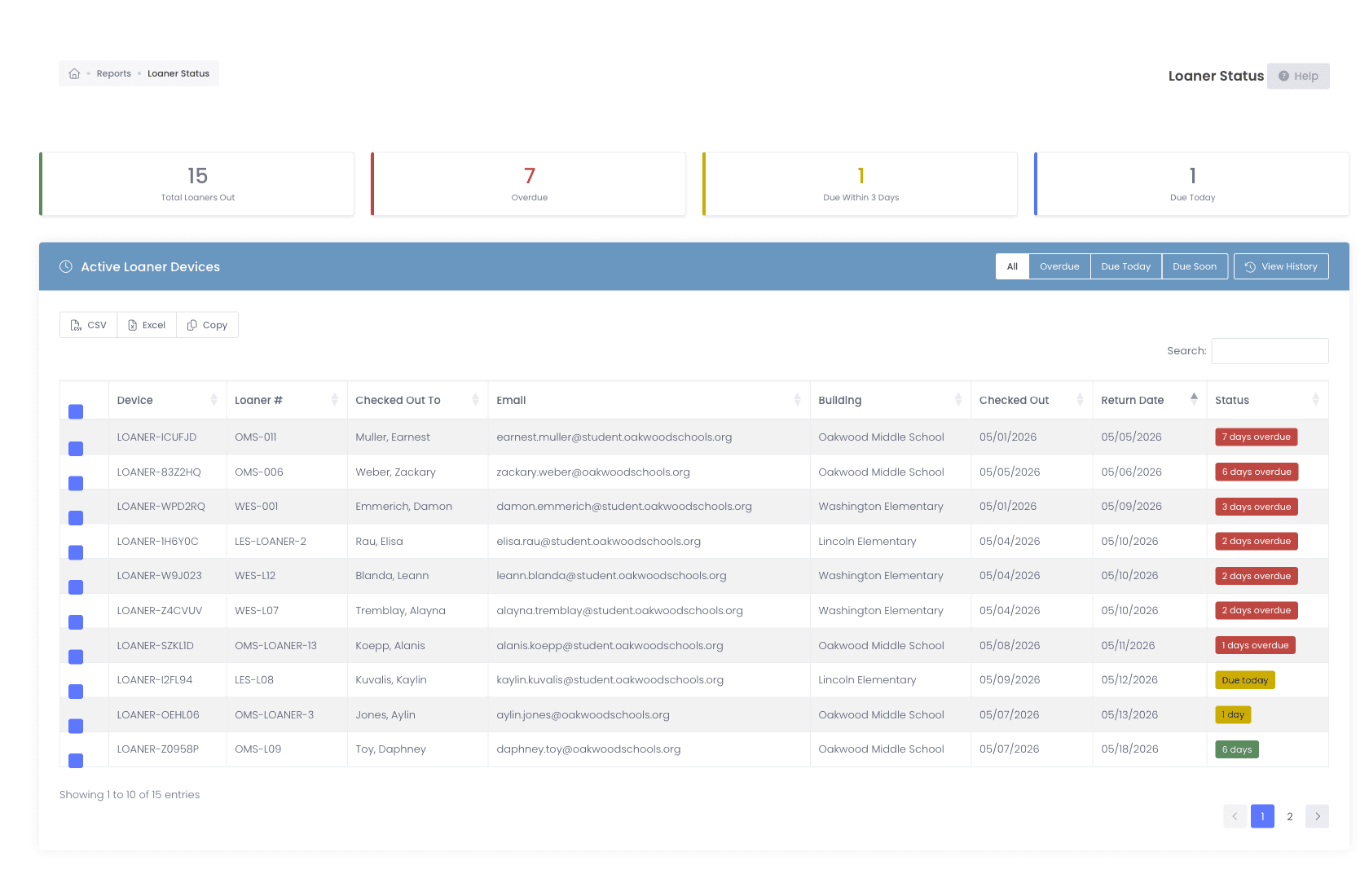
Loaners. Out. Overdue. Returned.
Loaner programs sound simple. Then you realize you have 15 of them out and seven are overdue. The Loaner Status report surfaces every counter at the top, total out, overdue, due today, due soon, with the underlying queue table sortable by building, return date, and student.
- Total / Overdue / Due Today / Due Soon counter cards
- Filterable queue by building, return date, status
- Loaner history report, issued, returned, lost, full audit trail
- CSV / Excel / Copy exports for board packets and parent letters
Incident queue + KPIs
Average hours to closure, across every incident.
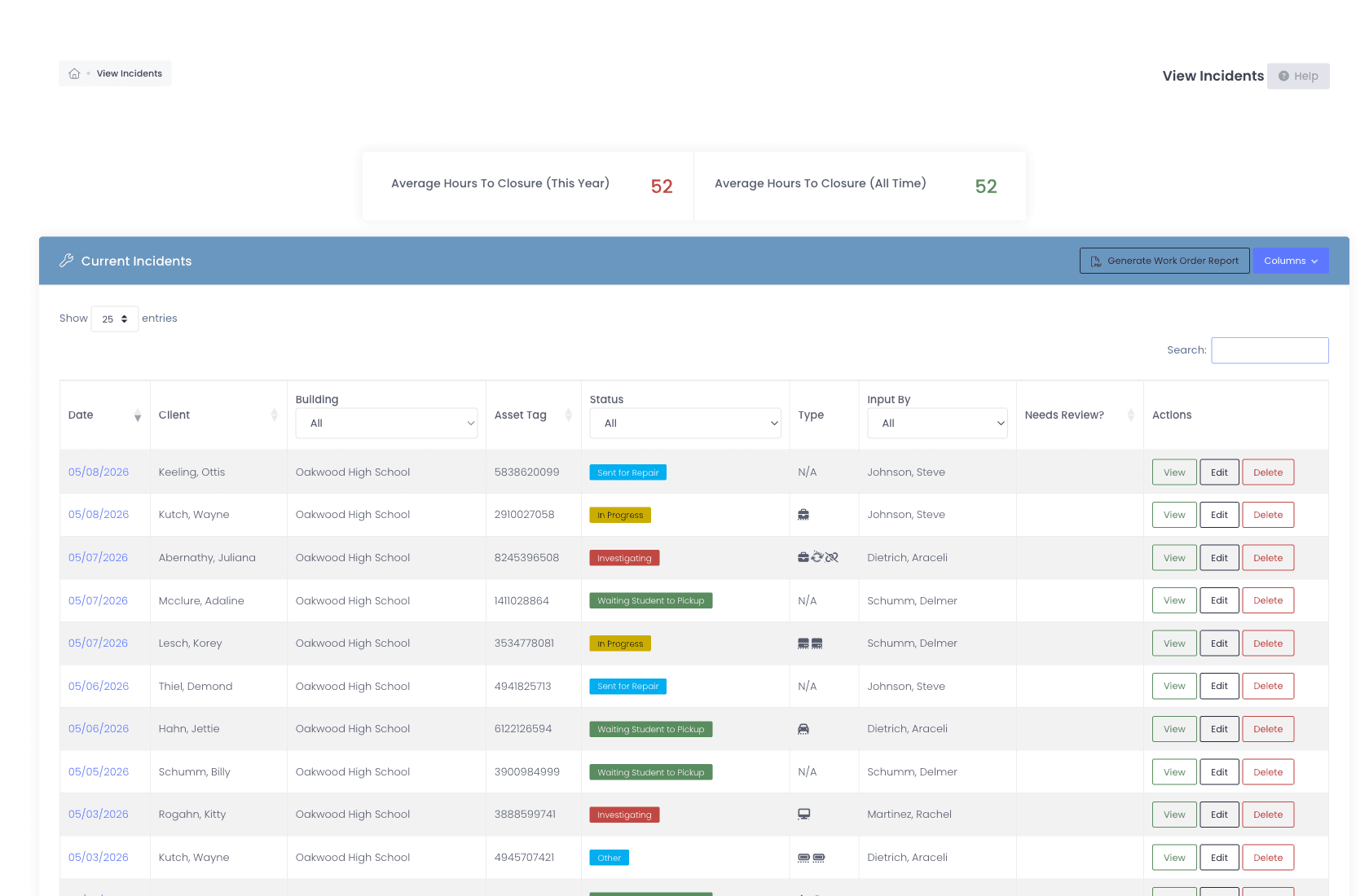
View Incidents pairs the year-over-year average-hours-to-closure KPI with the live incident queue underneath. Color-coded status pills (Sent for Repair, In Progress, Investigating, Waiting Student to Pickup) make queue health legible at a glance, sort by date, building, or assignee.
- Average Hours to Closure, this year vs all time
- Current Incidents queue with color-coded status pills
- Filter by building, status, asset tag, type, or assignee
- Generate Work Order Report straight from the queue
- Device Coverage report shows insurance keyed on the device, next to the user-based coverage report
Who is holding what
A signature on paper, produced from the system of record.
Handing a teacher a laptop, a document camera, and a spare charger in August works fine until June, when nobody can say what they were given. Assignment Sign-Off pulls everything currently assigned to one staff member or one room into a single list you can print for them to sign, or export to CSV for the audit.
- Pick a holder type, staff member or room, then the specific person or space
- Category, model, asset tag, serial, status, and date assigned for every item they hold
- Print a sign-off sheet for the start-of-year handout or the end-of-year collection
- CSV export for auditors and for the business office
- Scoped to the buildings you have access to, so a building admin sees their own campus

Refresh planning
Defend next year’s replacement budget with a number, not a guess.
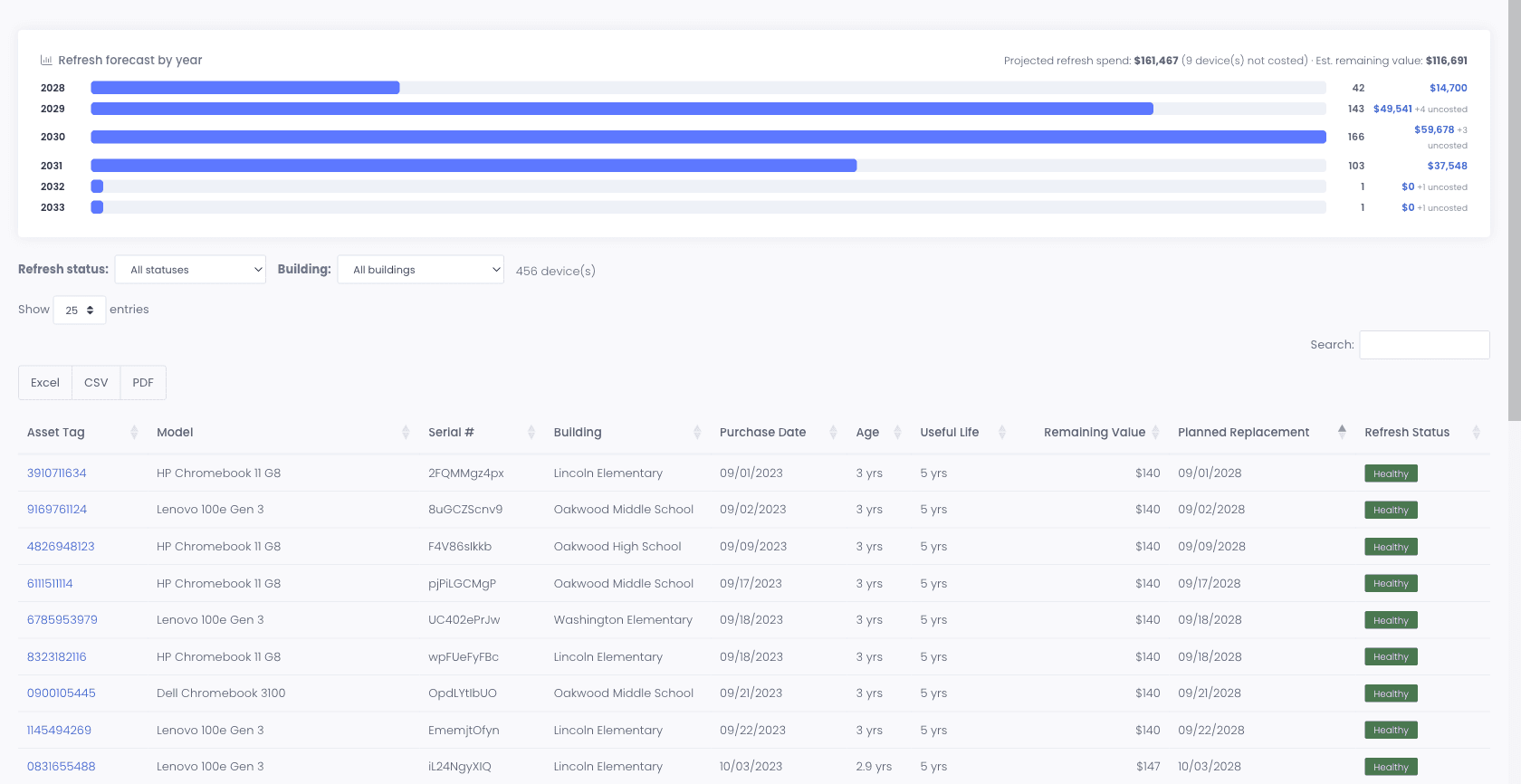
Set a useful life and a replacement cost once, per model or per category, and the platform turns your fleet into a dated, dollar-figured replacement plan. When the business office asks why you need the money, the answer is a report rather than a conversation.
- Useful-life and replacement-cost policy set per category or per model, inherited down your category tree
- A dollar-based refresh forecast of upcoming replacement spend, filterable by building for per-campus budgeting
- Estimated remaining value per device, with an optional salvage floor so it never falls below what a device is still worth
- Refresh status summarized on the admin dashboard, and remaining value shown on the device profile itself
- Battery health synced from your MDM, with a report that finds the batteries wearing out before they strand a student mid-class
CSV everywhere
Every report. Exportable. Auditable.
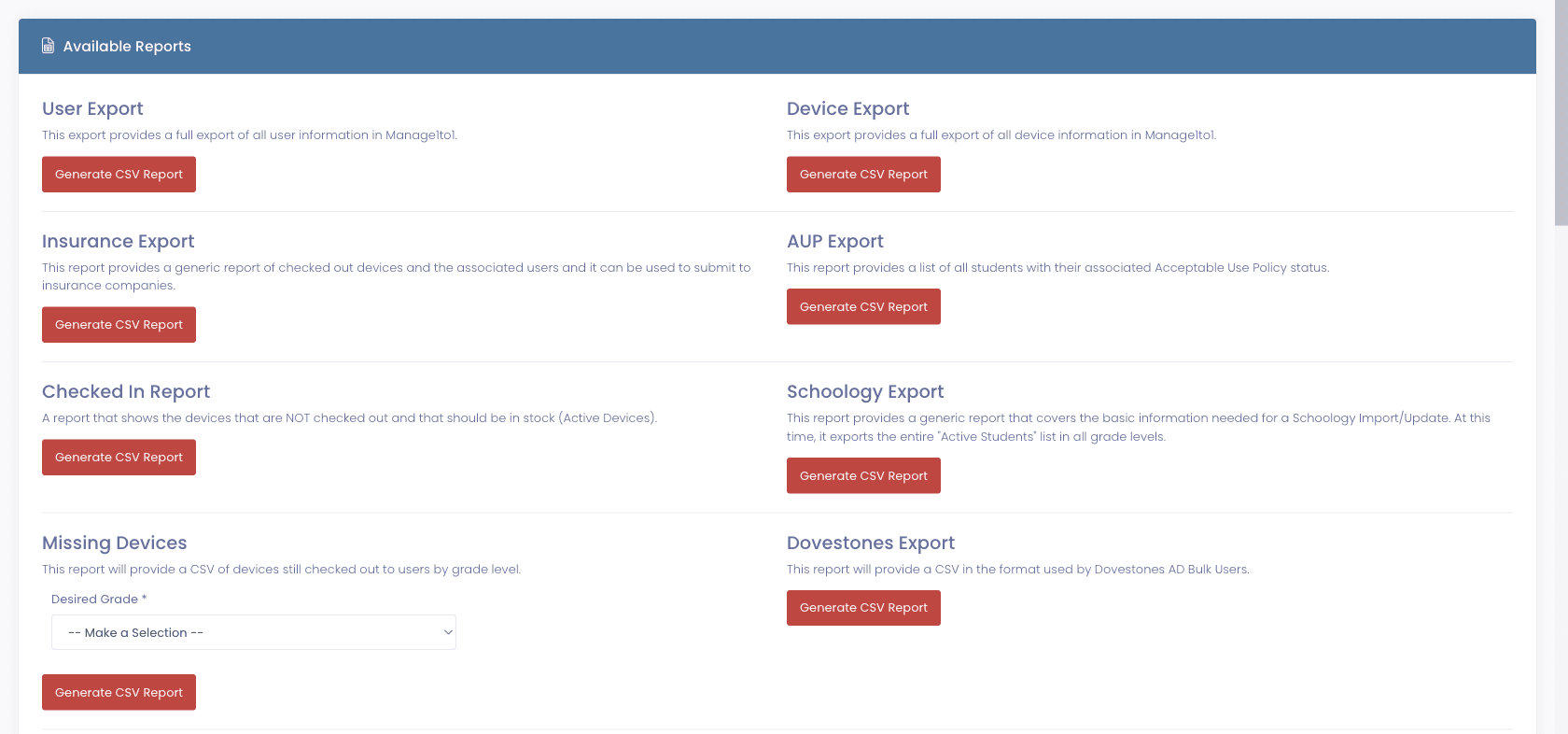
Board meetings, grant reports, state audits, they all want CSVs. Every report and every list view in our platform ships with CSV, Excel, and Copy exports. Filters carry over. Custom fields included.
- Every report has CSV + Excel + Copy export, no exceptions
- A Columns button on every report table, so you show or hide individual columns and send a board a report with only what they asked for
- Filtered views export exactly what you see
- Custom fields included in exports
- CSV import for bulk updates back into the system, with large device imports running in the background instead of timing out the page
- Pull the same data via the Manage1to1 REST API, self-service at every tier, using a scoped token you issue yourself
- A library of prebuilt exports for what districts get asked for most, including insurance submissions, AUP status, and devices still checked out by grade
Why schools choose Manage1to1
Built for K-12. Not retrofitted from enterprise IT.
Numbers a Tech Director can defend
Real metrics, built from the actual ticket + device + incident data, no separate analytics tool to sync, no Tableau license to buy.
Built for board meetings
CSV export everywhere. Per-role dashboards. The data is ready for the agenda packet, not stuck behind a query builder.
Live, not nightly
Dashboards reflect the current database. When you ask "how many tickets are open right now?" the answer matches what the technician sees.
Cross-MDM in one place
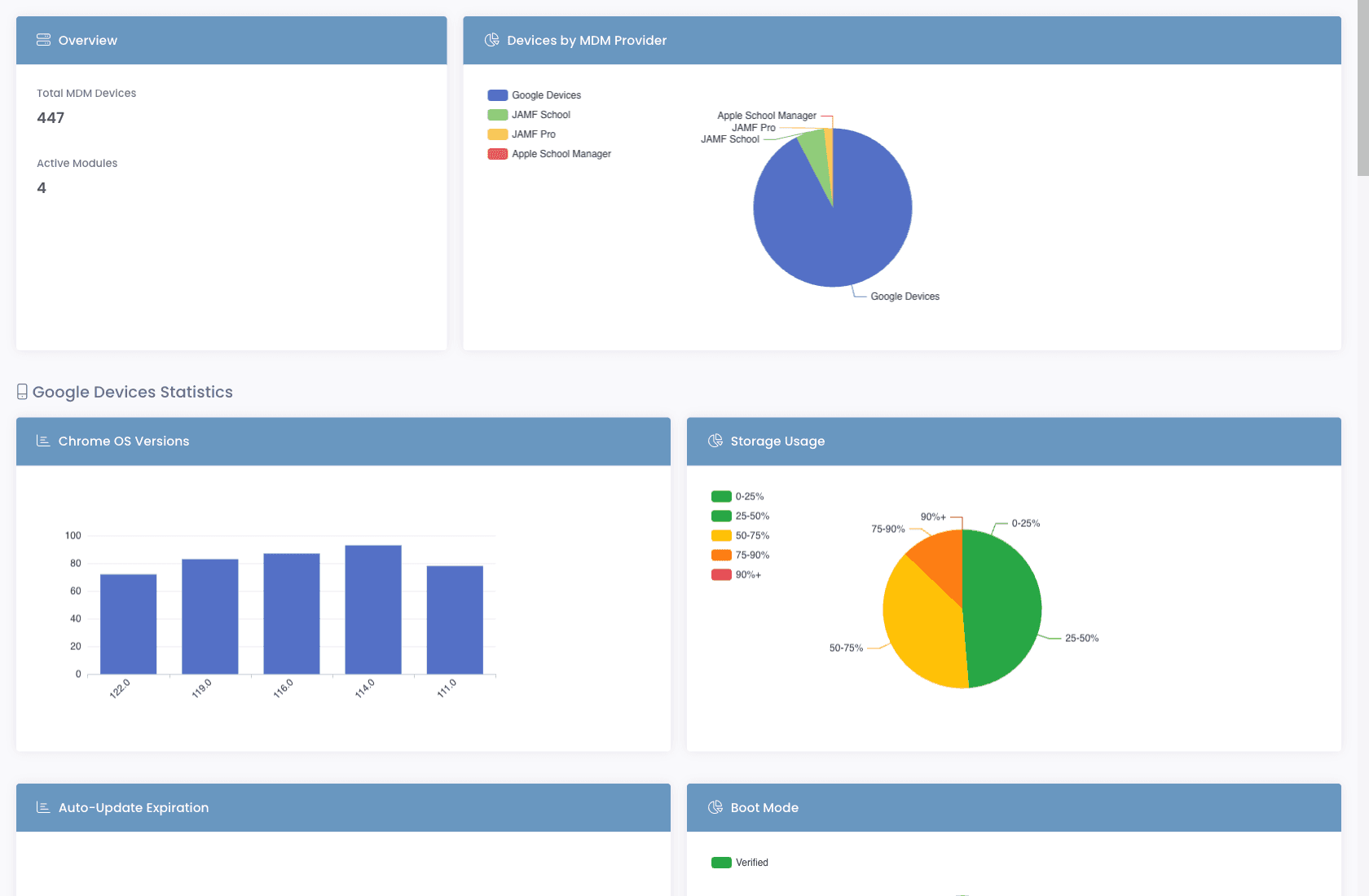
JAMF, Google, Apple School Manager, Intune, SCCM, FileWave, fleet stats rolled up across every MDM you run. Stop tab-hopping between vendor consoles for the same number.
FAQ
Common questions.
- Live. Ticket, incident, loaner, and invoice counters reflect the current state of the database. MDM-sourced fleet data syncs on a schedule from every provider you have connected, usually within minutes of a change in the vendor console, and those statistics are pre-aggregated during the sync so the telemetry reports open quickly rather than recomputing every time you load them.
- Yes. The Customize button on the dashboard lets you show, hide, and reorder cards. Different roles can save their own dashboard layout, a technician's view is different from a tech director's.
- Every report and every list view has CSV, Excel, and Copy export buttons. Filters carry over. Custom fields included. Pull the file the morning of the meeting and drop it into your packet.
- Yes. The Support Dashboard trends ticket volume, resolution time, and tech-vs-user replies over time. Filter by department, building, technician, or ticket type, the comparison cuts both vertically (this month vs last) and horizontally (this team vs another).
- Yes. Assignment Sign-Off gathers everything currently assigned to one staff member or one room into a single list, with category, model, asset tag, serial, status, and the date it was assigned. Print it for a signature at the August handout, or pull it again in June when you are collecting. It exports to CSV as well, and it is scoped to the buildings you have access to so a building admin only sees their own campus.
- You can pull CSV exports into any BI tool, or wire one up to the Manage1to1 REST API for live data. The API is self-service and included at every tier, so an administrator issues a scoped token themselves rather than opening a support request to have access switched on. Most districts find the built-in dashboards already answer what the board and superintendent are asking, but if you need to feed an enterprise data warehouse, the API is there.
- No. The REST API is included at every pricing tier and enabled by you, not by us. An administrator issues scoped tokens under Settings, and each token carries only the access it is granted. It reads and writes, so you can push devices in from a procurement system or open tickets from another tool, and every write is attributed to the administrator the token belongs to and recorded in the activity log as API-origin.
See it in action
Walk into the board meeting prepared.
Request a demo and explore the reporting dashboards with sample district data. Every number that matters for K-12 IT, already on the page.
- Quote tailored to your enrollment + SLA tier
- Migration plan from your current help-desk / asset tool
- Integration map for your MDM, SIS, and payment processor
- Honest answers, our team is all former K-12, we know what the product does and doesn’t do
Prefer the shared demo first? Try it at manage1to1.com/demo.