
A flat-deductible field isn’t insurance.
Real insurance contracts have co-pay, percentage coverage, a maximum, and a per-term claim cap. None of that fits into a single deductible field. We model the policy the way your contract reads, bill the premium and chase it automatically, and give the tech in front of the family a number they can trust at the moment of the incident instead of in a reconciliation spreadsheet later.
The coverage model
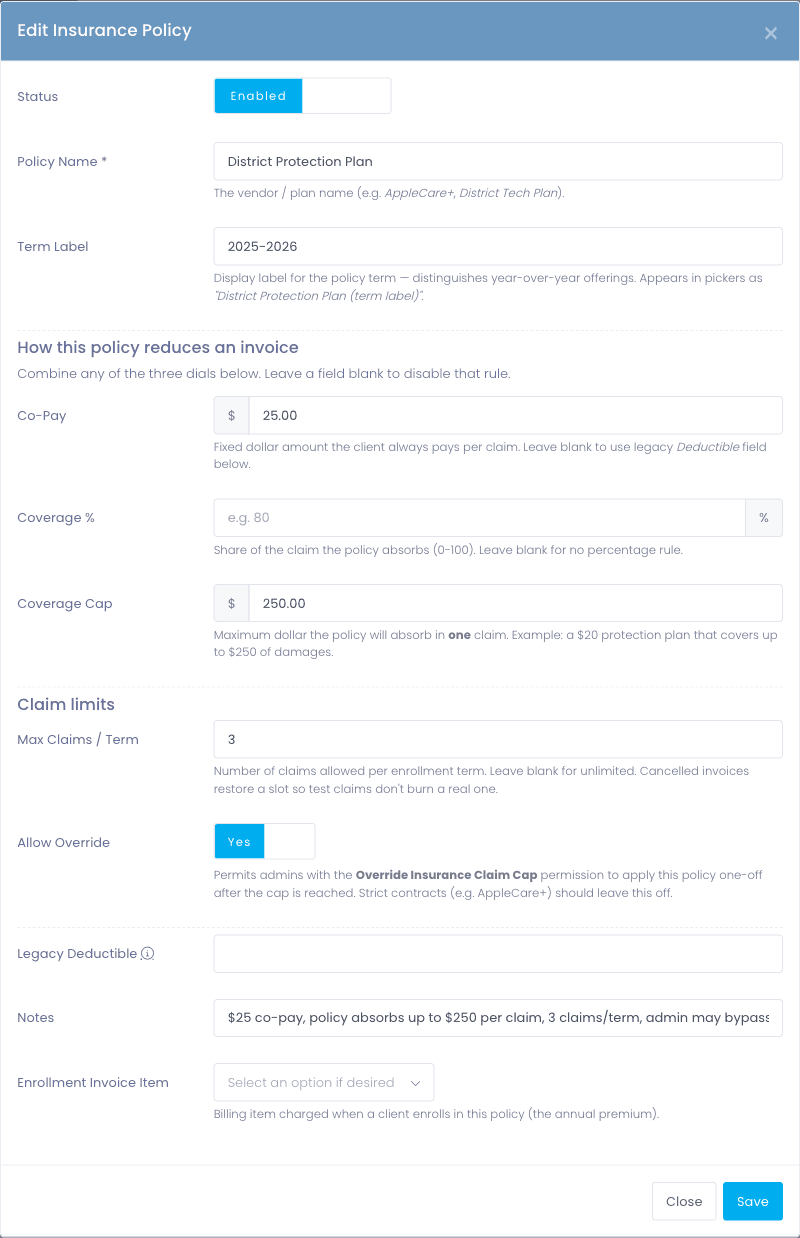
Four variables, all of them needed.
Insurance contracts almost never reduce to a single deductible number, and pretending they do leaves the calculation to a spreadsheet that nobody is auditing. Manage1to1 models the actual policy variables separately, so the math at incident time matches the math in the contract.
- Co-pay: fixed dollar amount the client owes regardless of the underlying cost
- Coverage percentage: the share of cost the policy absorbs (80% of the repair, for example)
- Coverage maximum: a ceiling on what the policy will absorb per incident
- Max claims per term: limit on how many times a policy can be used in a policy year, with an Unlimited option
- Admin override flag for emergency claims that need to exceed the cap, recorded with the override
Premium billing
Coverage that bills itself, and closes itself out.
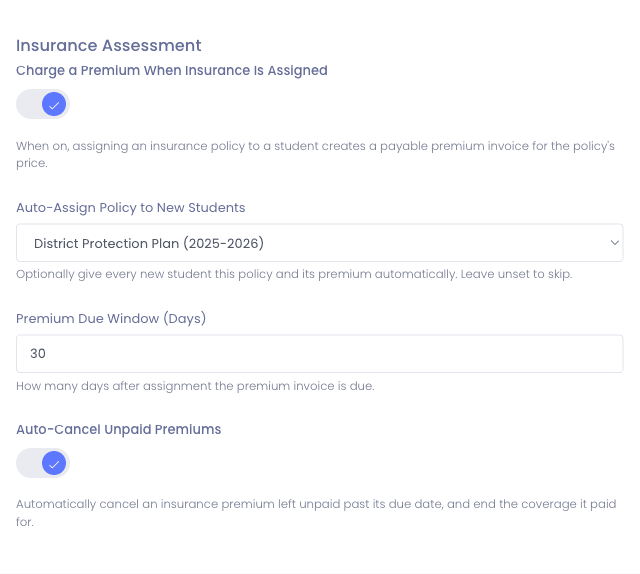
Assigning a policy used to be a coverage flag and nothing more, which left the actual premium to a separate fee list and a spreadsheet of who had paid. Now assignment creates a real, payable premium on the student account and the rest of the lifecycle runs on its own.
- Assigning insurance creates a payable premium, due a configurable number of days out (30 by default)
- Districts can auto-assess a default policy the moment a student is added, so nobody enrolls uncovered
- Schools that carry different coverage can set their own default policy, with the district-wide one as the fallback
- Coverage reads Pending while the premium is unpaid and becomes effective as of the payment date, and Declined if the premium is cancelled, so its state is never ambiguous
- A premium still unpaid past the window auto-cancels on a daily run, and the coverage ends with it
- Coverage state and billing state stay in agreement, so nothing sits half-paid and half-covered
- Provider-agnostic, the lifecycle is the same whether you use a carrier or self-insure
The whole program, once a year
Enrolling everyone shouldn’t mean enrolling them one at a time.
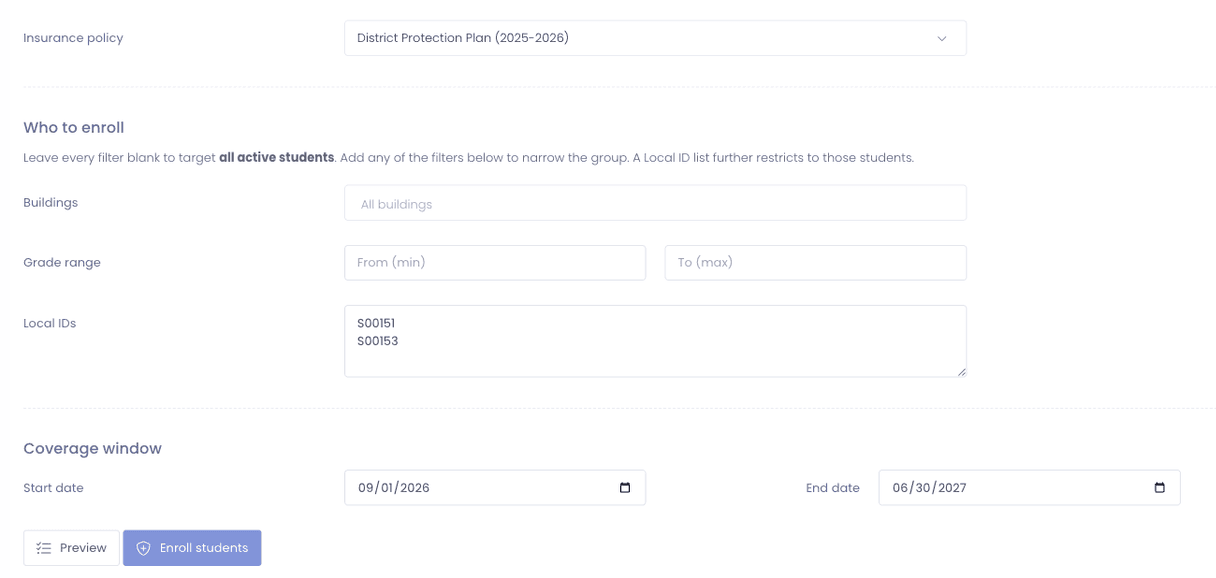
Auto-assign covers each new student as they arrive. It does nothing for the thousands already in your program on the first day of school, which is why that job usually becomes a week of clicking or a spreadsheet somebody imports and hopes for the best. Bulk Enroll does the whole program in one pass, and shows you the exact count before it changes anything.
- Pick a policy, then leave the filters blank for every active student or narrow by building, grade range, or a pasted list of Local IDs
- Preview first: see precisely how many students will be enrolled before you commit to anything
- Each enrollment creates the coverage and a payable premium invoice, the same result as assigning the policy by hand
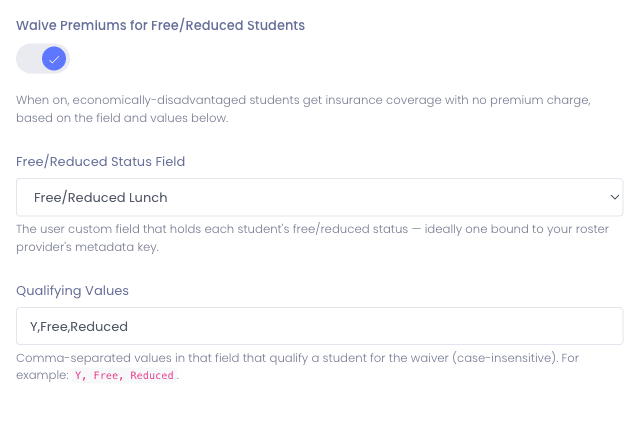
- Free and reduced students are waived on the run, a per-run toggle that is on by default
- Anyone already covered by that policy is skipped, so running it twice is safe rather than expensive
- Whole-district runs execute as a resumable background batch instead of timing out halfway through
Fee equity
Families who qualify are never charged in the first place.
Most device-fee programs handle free and reduced-lunch families by billing everyone and then refunding, or by asking a front-office secretary to remember who to skip. Both leak. Manage1to1 waives before the charge exists, driven by the flag your SIS already carries.
- Map the SIS field that carries economically disadvantaged / free-reduced status onto a Manage1to1 field with OneRoster metadata mapping
- Qualifying students are waived before any premium is created, so no invoice ever reaches the family
- An explicit waived state on the record, so staff can see why there is no charge rather than guessing
- Nightly roster syncs keep the flag current as families qualify or stop qualifying mid-year
- Waived families can be emailed a no-charge notice, so being covered for free is not something they have to infer from an invoice that never arrived
Why schools choose Manage1to1
Built for K-12. Not retrofitted from enterprise IT.
Coverage variables that match the contract
Co-pay, percentage, maximum, and claim cap as four distinct fields. What you enter on the policy is what gets applied on the incident.
The math runs while you’re looking at it
The family-vs-policy-vs-district split is calculated on the incident screen before the repair starts. No after-the-fact reconciliation.
Last year’s policy is still there
Each policy carries its own policy year, so historical claims stay attached to the rules that applied at the time. New rules roll forward without disturbing prior claims.
Reminders go before the lapse
Insurance Expiry Reminders email the family on a configurable cadence ahead of the policy end date. Coverage that ends shouldn’t be a surprise.
The premium collects itself
Assignment creates a payable premium; an unpaid one auto-cancels after your window instead of sitting on a list nobody works. Coverage and billing never disagree.
The yearly job is one pass
Bulk Enroll puts your whole existing program on a policy in a single run, with a preview of the exact count first and already-covered students skipped, so it is safe to run twice.
Free and reduced handled before the bill
Students flagged in your SIS as economically disadvantaged are waived up front. No invoice to the family, no refund cycle, no secretary keeping a list.
FAQ
Common questions.
- Not directly, and after thirteen years of K-12 work we’ve found you don’t need it to. You configure your district’s insurance program in Manage1to1 with its real-world coverage rules (co-pay, coverage percentage, coverage maximum, max claims per policy term), and the platform applies those rules per incident automatically. Worth Avenue, Securranty, a self-insured pool, or any other program, the tracking workflow is the same. What changes between vendors is the policy values you enter, not the workflow.
- The platform applies coverage percentage first, caps that absorbed amount at the coverage maximum if set, then adds the co-pay to the client’s share. The result is a per-incident breakdown showing what the policy pays, what the family owes, and what (if anything) the district is left holding. The calculation log backs it up at audit.
- A limit on how many times a single policy can be used within its policy term. Once the cap is reached, the option to apply that policy to a new incident is disabled on the incident screen. An admin-override flag (per policy) lets a supervisor bypass the cap for emergencies, and the override is recorded with the supervisor, timestamp, and reason. The cap resets automatically at the policy-year boundary.
- Yes. Each policy carries a policy-year label and historical claims stay attached to the policy version that covered them. When you roll out the new year’s policy with different co-pay or coverage rules, in-flight and historical claims under the old policy are unaffected. Audit trails reflect the rules that applied at the time of the incident.
- AppleCare+ is a hybrid (extended manufacturer warranty plus accidental damage with a co-pay) attached to a specific device serial. Manage1to1 tracks it as a separate coverage type from third-party insurance, synced device by device from Apple School Manager. The status surfaces on the incident screen alongside any third-party policy, so the tech sees both sources of coverage up front. When AppleCare+ ships a replacement, the new serial syncs back into the device record automatically.
- Yes. Assigning a policy to a student creates a real, payable premium on their account, due a configurable number of days out (30 by default). It behaves like any other invoice: it shows up in the Parent Portal, it can be paid online through whichever processor your district has connected, and it reconciles automatically. Districts that want everyone covered by default can auto-assess a policy the moment a student is added, so nobody ends up enrolled without coverage because a step got missed.
- Yes, that is what Bulk Enroll is for. Auto-assign handles each new student as they arrive, which does nothing for the students already in your program on the first day of school. Choose a policy, leave the filters blank for every active student or narrow by building, grade range, or a pasted list of Local IDs, and preview the exact count before you commit. Each enrollment creates the coverage and a payable premium the same way a manual assignment would, free and reduced students are waived on the run by default, and anyone already covered by that policy is skipped, so running it a second time costs nothing. A whole-district run executes as a resumable background batch rather than timing out partway through.
- Yes. The auto-assign default for new students can be set per school, with the district-wide policy as the fallback, so a new student is enrolled in their own school’s plan without anyone choosing it by hand. That matters in districts where the elementary plan and the high school plan carry different co-pays or coverage caps.
- Coverage reads Pending until the premium invoice is paid, then becomes effective as of the payment date. If the premium invoice is cancelled, the coverage reads Declined. Both states are explicit on the record rather than inferred, so a technician looking at the incident screen can tell the difference between covered, not yet covered, and no longer covered, which is exactly the distinction a family will argue about later.
- You set the window. A daily process declines any insurance premium still unpaid past it and ends the associated coverage at the same time. That matters because the failure mode in most districts is not an unpaid bill, it is a student who shows as covered on the incident screen months after the premium lapsed. Coverage state and billing state move together, so the number the tech sees at the counter is the number the district can defend.
- They are waived before a charge is ever created. You map the field your SIS already carries for economically disadvantaged status onto a Manage1to1 field, and students carrying that flag get an explicit waived state instead of a premium. No invoice goes out, so there is no refund cycle and no front-office list of who to skip. Because the mapping refreshes on the nightly roster sync, a family whose status changes mid-year is picked up on the next run.
- Yes. Waiving is a first-class action on the invoice, gated behind its own permission. It zeroes the balance, marks the invoice Waived (distinct from both a cash payment and a cancellation), captures the reason, and can send the family a Fee Waived notice. The original invoice and its line items are preserved, so an auditor can see the charge, the waiver, and who approved it.
- You configure the cadence as a comma-separated list of days before the policy end date. The default is 30,7 (one month and one week out). Some districts run a fuller cadence like 60,30,14,7,1 ahead of an annual renewal cycle. Reminders go to both the assigned user and any guardian on file. When the feature is first enabled, strict-equality matching and a sent-log prevent retroactive blast emails for already-expired coverage.
See what fits your district
Stop calculating insurance in a spreadsheet.
Tell us about your insurance program: the carrier (or that you self-insure), the co-pay and percentage rules, the claim cap. We’ll reply with a quote, a migration plan, and a sample calculation against a real incident so you can see the workflow against your real numbers.
- Quote tailored to your enrollment + SLA tier
- Migration plan from your current help-desk / asset tool
- Integration map for your MDM, SIS, and payment processor
- Honest answers, our team is all former K-12, we know what the product does and doesn’t do
Prefer the shared demo first? Try it at manage1to1.com/demo.