
Your whole help desk and inventory, in your pocket.
Technicians spend the day between buildings, not behind a desk. Install Manage1to1 to a phone’s home screen and it turns into an app built for one hand: a tab bar at the bottom, tickets and devices as cards, the camera as a barcode scanner, and a push the moment a ticket lands on you.
Included at every tier. Nothing to download from an app store. The demo runs it too, so you can try it on your own phone.
Install it to the home screen
Add it from Safari, Chrome, or Edge and it opens full-screen with its own icon, no browser bar, and updates itself.
A tab bar for your thumb
Devices, Tickets, and Incidents sit at the bottom of the screen, with everything else one tap away under More.
The scanner is everywhere
Any search box that expects a device shows a scan button. The phone camera is the barcode scanner.
Push when it matters
Opt in and a ticket assigned to you, or one that changes status, reaches the phone with the app closed.
The queue
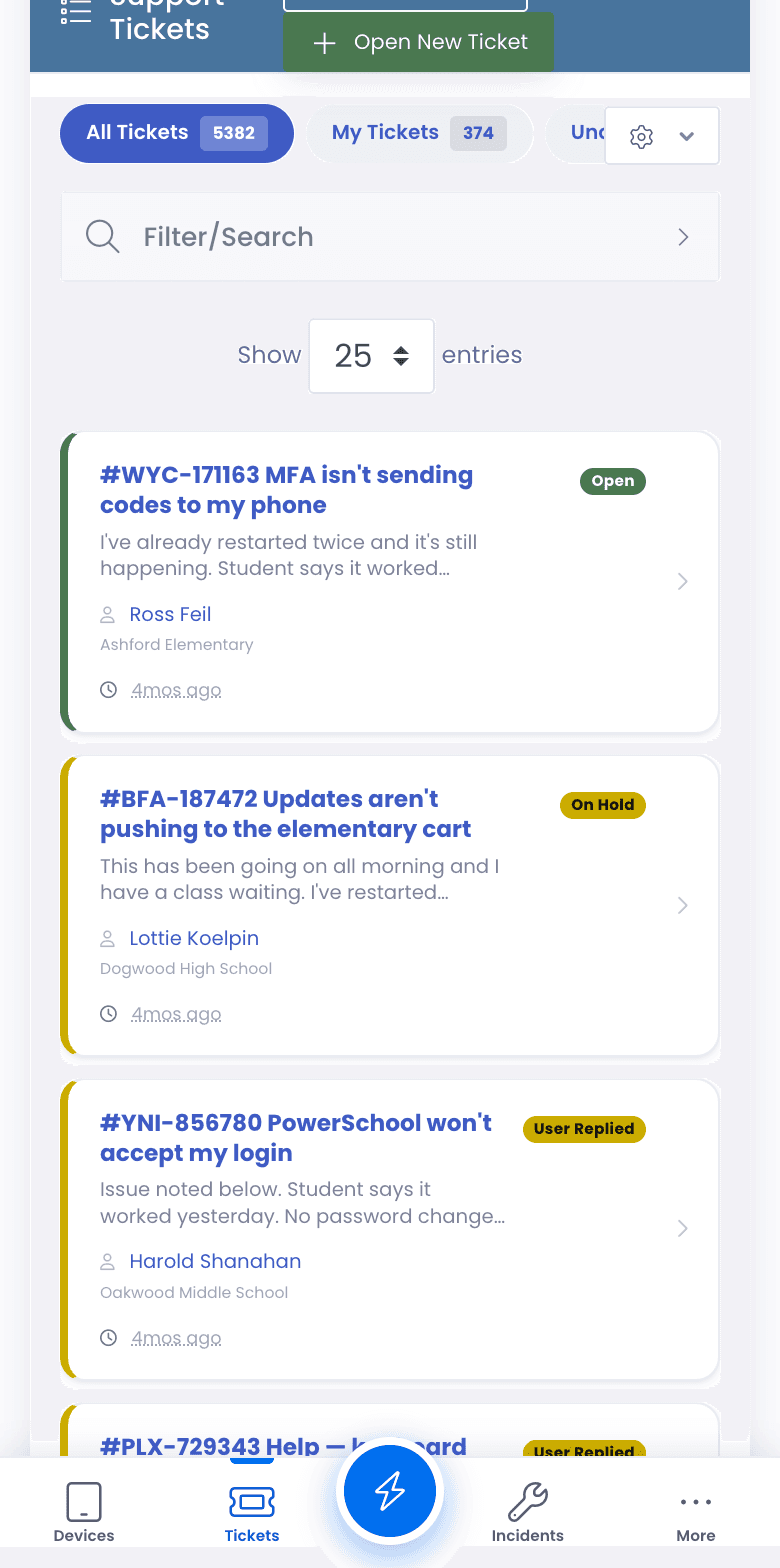
Triage the queue without opening a single ticket.
A table built for a 27-inch monitor turns into a sideways-scrolling mess on a phone, so on a phone the queue becomes a stack of cards. Each card carries enough to decide what to do next, which means the walk between two buildings is enough time to pick up the next job.
- Ticket number and subject, with a colored status pill and a matching stripe down the card
- A short preview of the problem, the requester, their building, and the room when the device has one
- How long ago it came in
- All Tickets, My Tickets, and your custom queues work exactly as they do on a computer
The fleet
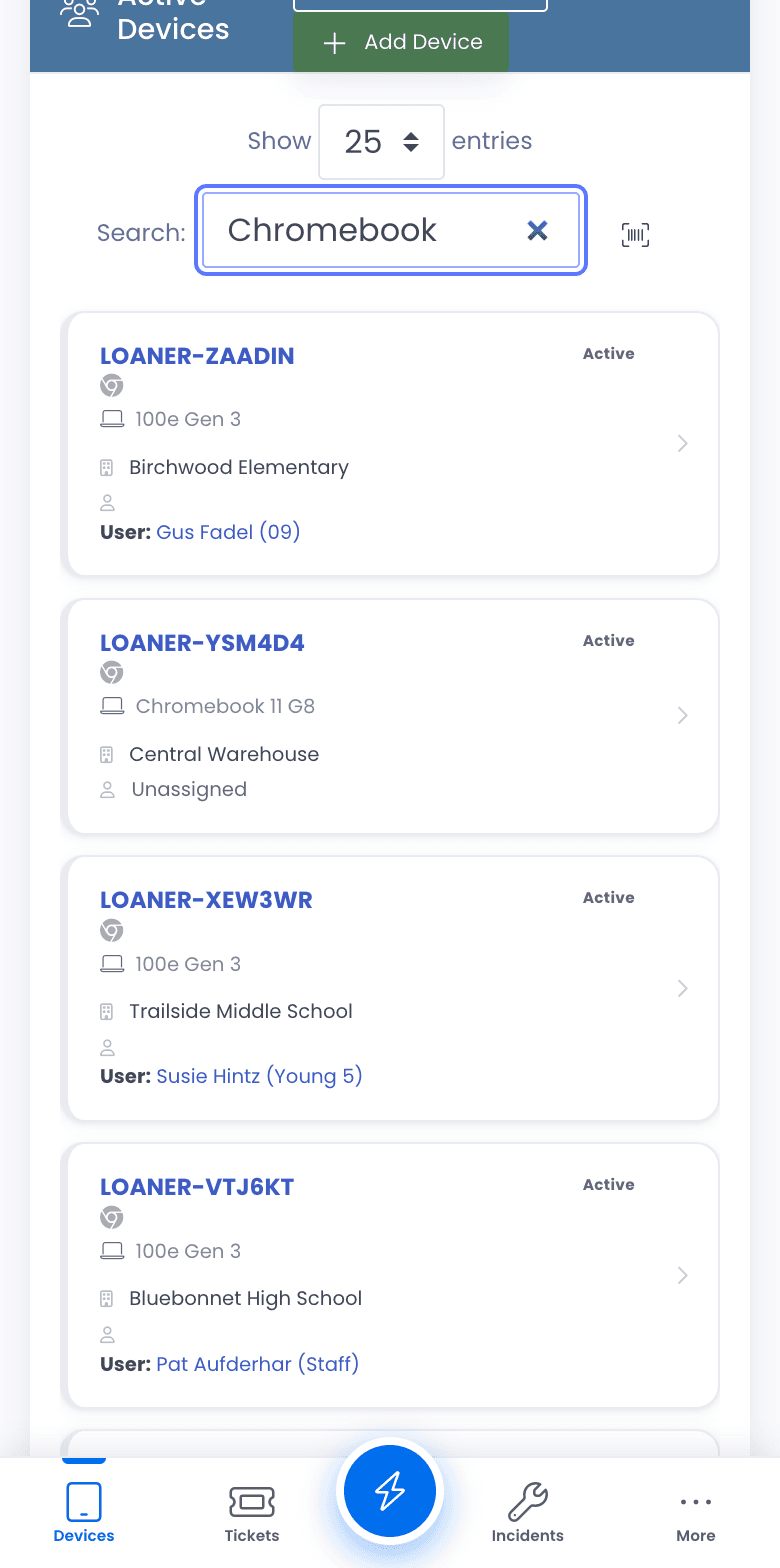
Point the camera, land on the device.
The device list follows the same pattern: asset tag, model, building, status, and who has it, on a card you can read at arm’s length. The scan button sits beside the search box, so finding a Chromebook somebody handed you in the hallway is one tap and one barcode.
- Asset tag, model, building, status, and the assigned user on every card
- Scan to search from the device list and anywhere else a form asks for a device
- Reads 1D barcodes and QR codes from any phone with a rear camera
- Desktop users with a USB scanner never see the camera button
Quick actions
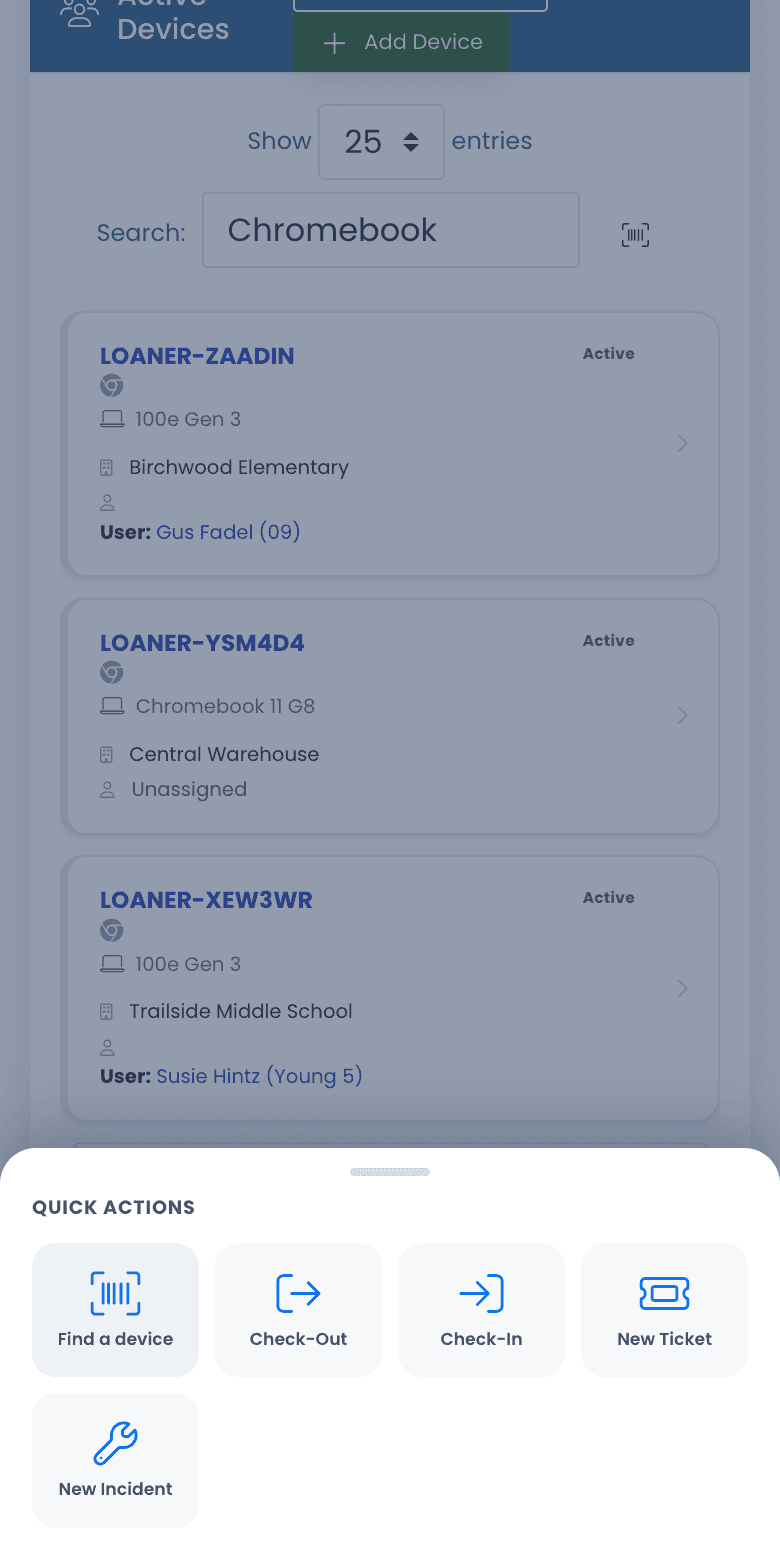
The five things you do all day, from any screen.
The button in the middle of the tab bar opens a sheet for the tasks a technician reaches for constantly. Find a device opens the scanner straight away. The busiest forms open as single-column sheets sized for a thumb rather than a wide layout meant for a mouse.
- Find a device, Check-Out, Check-In, New Ticket, and New Incident
- Starts from whatever screen you are on, so there is no navigating back to a menu first
- Swipe it down or tap outside to close it
Nothing removed
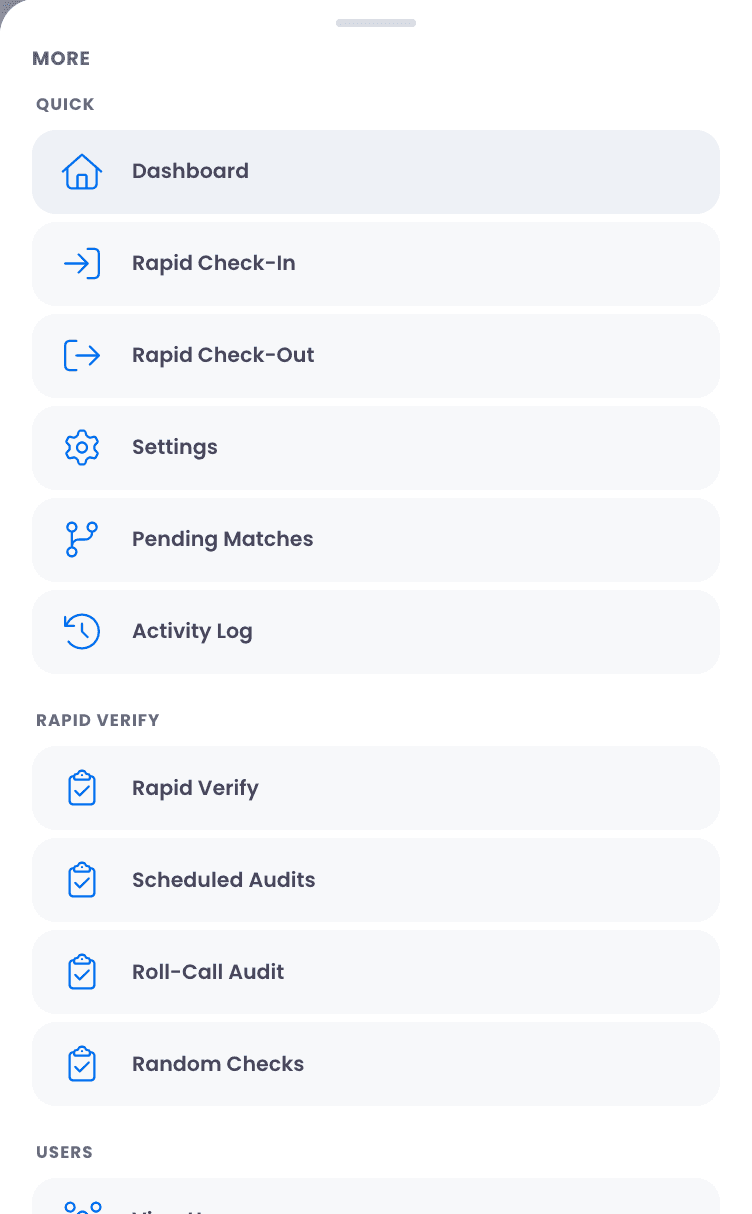
It is the whole platform, not a phone-sized subset.
A lot of mobile apps are a cut-down companion to the real product. This is not that. Everything in the desktop menu is still reachable under More, one tap further in, so a technician in the field never has to say “I will do that when I am back at my desk.”
- Dashboards, Rapid Check-In and Check-Out, audits, users, reports, and settings, all under More
- Tab bar destinations and quick actions start with sensible defaults for each role
- The same permissions apply as on a computer, so a role sees on the phone exactly what it sees at a desk
The closet
Audit the closet where the devices actually are.
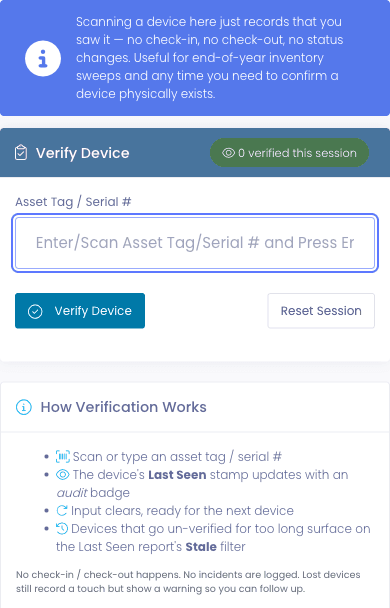
Rapid Verify, Rapid Check-In, Rapid Check-Out, and roll-call cart scans were already built to run on a phone. With the app installed they open full-screen alongside everything else, so a sweep of a storage closet is a phone in one hand and devices in the other.
- Rapid Verify stamps Last Seen without checking anything in or out
- Roll-call a cart or a room and see what is missing
- A live session tally so you know how many you have covered
Straight answers
What it is, and what it isn’t.
Our whole team is former K-12 IT, and we have all been sold a mobile app that turned out to be a login screen and a ticket form. Here is exactly what you are getting.
It is
- The full platform, laid out for a phone
- Installable from Safari, Chrome, or Edge
- Push notifications for assignments and status changes
- The camera as your barcode scanner
- Included at every pricing tier
It isn’t
- An App Store or Google Play download
- An offline app; it needs a connection
- A different product from the one on your desktop
- An add-on with its own price
FAQ
Questions about the phone layout.
- No, and you do not need one. Manage1to1 installs straight from the browser: Add to Home Screen in Safari on an iPhone or iPad, or the install option in Chrome or Edge on Android, Windows, and Mac. It gets its own icon, opens full-screen without the browser bar, appears in the app switcher, and updates itself, so there is no store listing to manage and no version for your team to keep current.
- No. It is a live connection to your district’s data, so viewing or changing records needs signal. The installed app does handle a dropped connection better than a browser tab, with a clear offline screen and a Try Again button instead of a broken page, and it opens faster because it keeps its own interface files after the first visit. A basement closet with no coverage is still a basement closet with no coverage, and we would rather say so here than have you find out on audit day.
- Yes, once Manage1to1 is added to the home screen. Push is opt-in per person, and covers a ticket being assigned to you and a ticket changing status. If you would rather not have pushes, nothing changes, and email notifications carry on as before.
- The phone layout applies on phone-sized screens and in the installed app on a phone. On a desktop, a Chromebook, or a wide tablet you keep the full sidebar and tables. There is nothing to switch on; it adapts to the screen in front of you.
- Yes. Every ticket notification email has a one-click close link, and a technician can reply with short commands to change the status, assignee, priority, or department, or add an internal note. It is often the fastest option from a phone when the ticket only needs one change.
- No. It is the same product on a different screen, included at every pricing tier with no per-device or per-user charge, the same as everything else we sell.
See it on your own phone
Try it on your own phone before you talk to anyone.
Request demo access, open the link on your phone, and add it to your home screen. A couple of minutes later you are working a ticket queue as cards with the tab bar under your thumb, in the same shared sample district everyone else uses. Or tell us about your district, how many technicians you have and how many buildings they cover, and we will send a quote and an honest read on how your team would use it day to day.
- Quote tailored to your enrollment + SLA tier
- Migration plan from your current help-desk / asset tool
- Integration map for your MDM, SIS, and payment processor
- Honest answers, our team is all former K-12, we know what the product does and doesn’t do
Prefer the shared demo first? Try it at manage1to1.com/demo.