
October 6, 2026 · Manage1to1
Device Fee Collection: Why Half Your Invoices Never Get Paid
Districts collecting under half of what they invoice usually do not have a policy problem, they have a checkout problem. What the collection year actually looks like, where families drop off, and what moves the number.
You wrote the policy. You set the fee schedule, got it into the handbook, and made sure every building was charging the same thing for the same cracked screen. The invoices went out in August. In November the business office tells you that a little under half of it came in.
The instinct at that point is to go back to the policy. Make the language firmer. Add a consequence. Send a second notice with a deadline in bold.
That is almost always the wrong place to look. A family that opens an invoice for $75 and does not pay it is usually not refusing. They are getting interrupted, and every interruption between the email and the receipt sheds a percentage of them. The policy decided the number on the invoice. Everything after that is logistics, and logistics is where the money goes.
You invoice twice a year. That is the whole window.
Most districts are not billing families continuously. They are running two events.
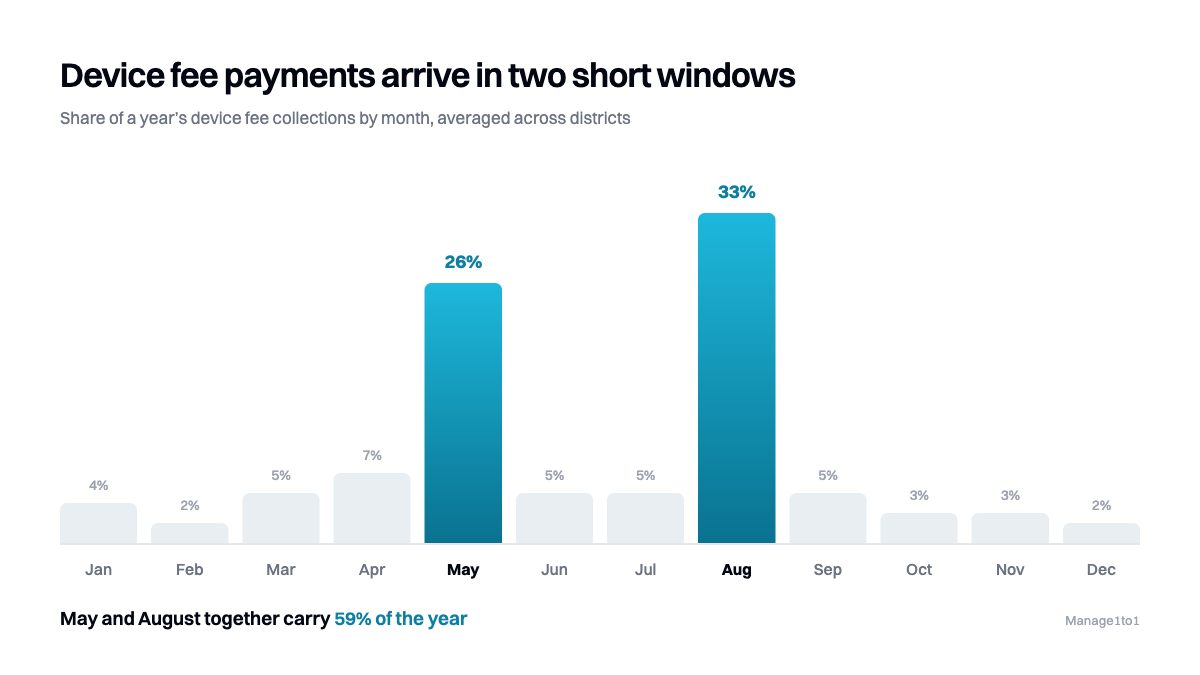
May, when devices come back, damage gets reconciled, and the ones that never came back get charged. August, when the new year's insurance premiums go out alongside whatever was still outstanding from the spring.
That is it. Two invoicing events, and collections follow the same shape. Plot any district's device fee payments by month and you get two tall months and a long flat line. We have looked at this across several districts now and it barely varies.
Two events a year is a different problem from continuous billing, and it is worse in one specific way: you do not get a second attempt. A business that bills monthly and loses a payment in August tries again in September, and again in October, and the gap quietly closes. You get one attempt in May and one in August. If a family bounces off your payment page in the second week of August, they do not come back in November. The flat November column is the proof.
So friction does not cost you a little, spread thinly across a year. It takes a bite out of one of your two attempts, in a handful of weeks when you were least able to watch for it, because that is also when every other thing in your department is happening at once. We wrote separately about running the end-of-year collection window itself, which is the other half of this problem.
Which leads to the only instruction that really matters here. You get two chances a year, so make both of them as easy to act on as humanly possible. Everything below is a version of that one idea.
Where the money actually leaks
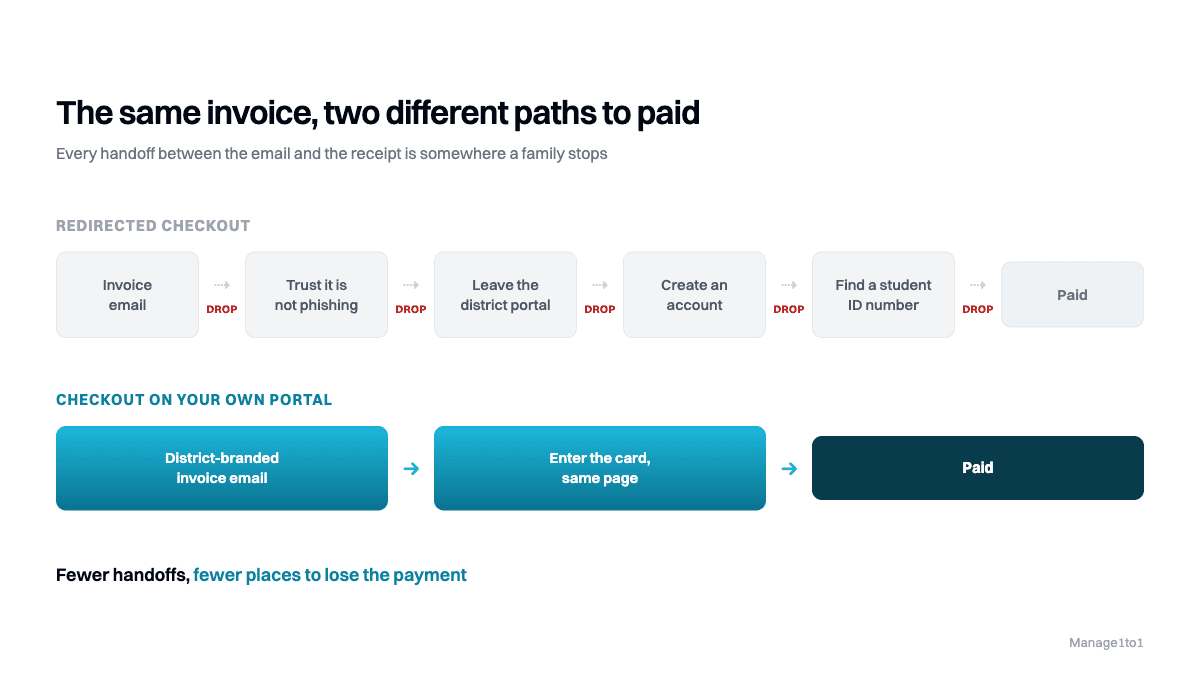
It helps to walk the path a family takes, step by step, and be honest about what each step costs you. A guardian receives an email about a $75 charge for a screen. Between that email and a posted payment:
Does the email arrive at all? Guardian addresses in a student information system go stale constantly. People change jobs, change providers, mistype at registration. If a message hard bounces and nothing in your system notices, you have an invoice that is, from the family's point of view, a charge they were never told about. The first they hear of it is a phone call in the spring.
Does it look like it came from the district? A payment request from an unfamiliar sender, about money, is exactly the shape of a phishing email. Cautious families are supposed to ignore it. Many do.
Do they get sent somewhere else to pay? This is the big one. A link that bounces the family from your portal to a third-party processor's checkout page, with different branding, is the single steepest drop in the whole sequence. It reads as a handoff to a stranger, and it happens at the exact moment you are asking for a card number.
Are they asked to make an account first? Account creation before payment is a wall. A family paying $75 once a year will not create a login to do it.
Are they asked for something they do not have? A student ID number, a lunch account number, an invoice reference from a letter they threw away. Every field a guardian cannot fill in from memory is an exit.
None of those are individually dramatic. They compound. Five steps that each lose a quarter of the people who reach them leave you with less than a quarter of where you started, which is roughly the range districts land in when nobody has looked at this path.
What the numbers look like when it is fixed
Across the districts we can see, the pattern is consistent enough to be worth stating plainly.
Before they enabled direct online payment, districts were collecting under half of what they invoiced. After, every one of them is above 70 percent, and several are in the 90s.
A caveat, because it matters: that is our own observation across our own customers, not a controlled study. The districts that chose to turn online payment on were probably already the ones paying attention to collections, so some of that gain belongs to the attention rather than the mechanism. Treat it as directional.
The direction is not subtle, though. Nothing about those districts' fee schedules changed. The charge for a cracked screen was the same number before and after. What changed was how many steps stood between a guardian deciding to pay and the payment being done.
What changed in October
Until recently there was a practical reason districts put this off, and it was not reluctance. Connecting a processor meant a conversation with us, and the district's existing merchant relationship, the one finance already had for athletics and lunch money, often could not be used. So the project sat.
In our October release that went away. There are now eight processors you set up yourself, from Settings, Payment Gateways, with nothing to request from us: Stripe, PayPal, Square, Authorize.Net, Braintree, Adyen, Global Payments, and SchoolPay. Pick one, enter your credentials, and switch on Show in Parent Portal when you are ready for families to see it. You can run several at once and turn each on or off independently. ConnexPoint, which districts were already using, continues alongside them.
Two details in that are the ones that matter for collection rate.
Seven of the eight take the card without the family leaving your portal. Stripe, PayPal, Square, Authorize.Net, Braintree, Adyen, and Global Payments all collect the card details on your own page. The guardian stays on the district-branded portal from the invoice through to the receipt, and the steepest drop in the sequence above simply does not happen. SchoolPay is the exception and uses its own hosted checkout, which is a reasonable trade if SchoolPay is already what your families know.
You use the processor finance already has. That removes the approval conversation, which is usually the thing that actually delays this by a budget cycle. The money lands in the account it already lands in, reconciled the way it is already reconciled.
We do not take a cut, and we will build the one you are missing. The money goes from the family to your processor to your account. We never hold it and we never touch it, and there is no per-transaction fee from us on top of whatever your processor already charges you. If the processor your district uses is not on that list, tell us and we will add it at no charge. We would rather write a connector than have you change merchant accounts to suit our roadmap.
The full list of what connects, payments included, is on the integrations page.
The parts that are not the checkout
Checkout is the biggest leak, but it is not the only one, and a couple of the smaller ones are worth closing at the same time.
You can now see the email that failed. Settings, Email Queue lists outbound family mail with its status, how many attempts it has had, and the actual reason each one stalled. You can re-send a single message or clear the whole backlog with Retry All Failed. Before this, a message that failed was invisible, and an invisible failure in August is money you never find out you lost.
Bad addresses now drop off by themselves. When a mail provider reports a hard bounce or a complaint, we record it and stop mailing that address, which protects your district's sending reputation so the messages that can be delivered still are.
Covered families stop getting payment requests. If an invoice is already covered by insurance, the standard please-pay email is the wrong note. Billing Automation can now send a dedicated Invoice Created, Insured notice instead, telling the family they are covered and owe nothing. It is off until you turn it on. This one does not raise your collection rate directly, it lowers the volume of confused replies that eat the front office's August, which is the same resource.
Free and reduced families are not billed by mistake. A premium is no longer assessed before a student's free and reduced status is known, and one charged before a late update is waived and credited automatically. A wrongly issued charge to a family who should have been exempt costs far more in trust and phone calls than it ever brings in.
And if you want that mail to come from the district rather than from us, outbound family email can send from a per-district verified sending subdomain carrying your logo, which addresses the does-this-look-like-phishing problem at its source.
Find out what your own number is
Most districts do not actually know their collection rate. They know roughly what came in and roughly what the program cost, which is not the same thing and hides exactly the gap worth finding.
The rebuilt Quick Stats dashboard in reporting carries the financial charts behind the View Billing permission, and every chart is clickable: select a bar or a month and you get the records behind it, each linked to the invoice it came from. That is enough to answer three questions properly.
- What proportion of what you invoiced last year was actually paid? Not the dollar total, the proportion. That is your baseline.
- Where in the year did it come in? If your curve has the two-spike shape, your effort belongs in May and August and almost nowhere else.
- How much of the unpaid balance is families who never got a deliverable email? Email Queue answers this one, and the answer is usually higher than anyone expects.
If your number is under half, the gap is very unlikely to be in your fee schedule. Our device fee policy template covers the policy side properly, and the honest summary is that policy decides what is fair, not what is collected.
The thesis, plainly
Families are not refusing to pay for a cracked screen. In a year when they renew car insurance, buy school pictures, and pay for a field trip on their phone in under a minute each, they will pay a $75 device charge too, if paying takes under a minute and happens somewhere that looks like the district.
Every step you add takes a cut, and the redirect takes the biggest one. You get two chances a year to ask, so the entire job is making those two asks trivially easy to say yes to. Remove the steps and the number moves. That is the whole of it.
If you want to see the path from a cracked screen to a posted payment on real data, book a demo and we will walk it end to end: the incident, the family invoice, the card taken on your own portal, and the payment posting back against the record it came from. Our team is all former K-12 IT, so we will also tell you which parts of your collection problem the software genuinely will not fix.